Suunto Traverse User Guide - 2.1
Service menu
To access the service menu, keep and pressed simultaneously until the watch enters the service menu.
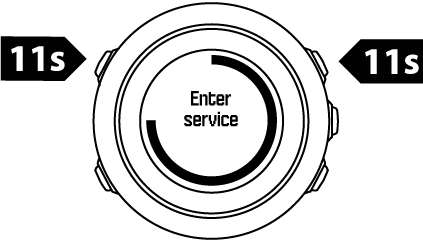
The service menu includes the following items:
- Info:
- Air pressure: shows the current absolute air pressure and temperature.
- Version: shows the current software and hardware version.
- BLE: shows the current Bluetooth Smart version.
- Display:
- LCD test: allows you to test that the LCD works properly.
- ACTION:
- Power off: allows you to put the watch into deep sleep.
- GPS reset: allows you to reset GPS.
NOTE:
Power off is a low power state. Follow the normal startup procedure to wake up the device. All settings except time and date are maintained. Just confirm them through the startup wizard.
NOTE:
The watch switches to power saving mode when it is static for 10 minutes. The watch re-activates when moved.
NOTE:
Service menu content is subject to change without notice during updates.
Resetting GPS
In case the GPS unit cannot find a signal, you can reset GPS data in the service menu.
To reset GPS:
- In the service menu, scroll to ACTION with and enter with .
- Press to scroll to GPS reset and enter with .
- Press to confirm GPS reset, or press to cancel.
NOTE:
Resetting GPS resets GPS data and compass calibration values. Saved logs are not removed.