Suunto Nautic User Guide
Edit gas
When diving with gas mixtures, the oxygen fraction and partial pressure limits must be entered to ensure accurate nitrogen and oxygen calculations and a correct maximum operating depth (MOD).
In single gas mode, you can edit the oxygen percentage (O₂%) of the active gas. The oxygen fraction can be adjusted between 21% and 100%.
In multi-gas mode, you can also edit the helium (He%) fraction in addition to oxygen. When diving with helium, the combined value of oxygen and helium is always 100%. The oxygen fraction can be adjusted between 5% and 100%.
The default oxygen percentage is 21% (air) and the default oxygen partial pressure (ppO₂) is 1.4 bar.
The ppO₂ setting determines the MOD, which defines the safe depth limit for the selected gas. You can set ppO₂ to 1.0, 1.1, 1.2, 1.3, 1.4, 1.5, or 1.6 bar.
Gas settings are adjusted in the Edit gas view by selecting the desired mixture.

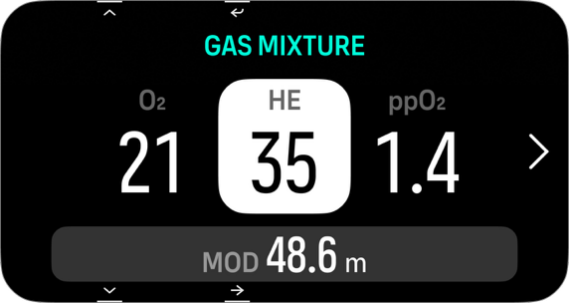
Do not change these values unless you fully understand the effect.
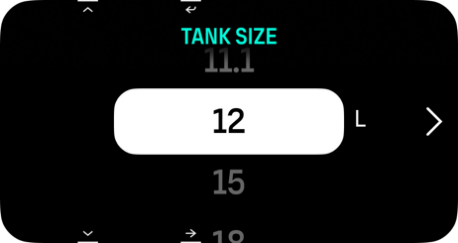
In the Edit gas menu you can also set your tank size. The default value is 12 liters / 80 cu ft. Make sure you set your correct tank size to ensure correct gas consumption calculations when diving with Suunto Tank POD.
From the Edit gas menu you can also pair your Suunto Tank POD. See How to install and link a Suunto Tank POD for information about the wireless tank pressure pairing.