Suunto Nautic User Guide
Device lock
You can lock your device after setting a passcode in Device settings > Device lock.
This function is useful if you are not wearing your device and you do not want anyone else to use the device or modify your settings. If you set a passcode, your device will be automatically locked when the device goes idle, that is, after 15 minutes of inactivity, and you can unlock it with the passcode.
To set a passcode:
- Go to Device settings > Device lock.
- Toggle on the Use passcode option.
Set your six-digit passcode including numbers 1, 2, 3 and 4 by means of the device buttons. Long press the back button if you want to clear the numbers.
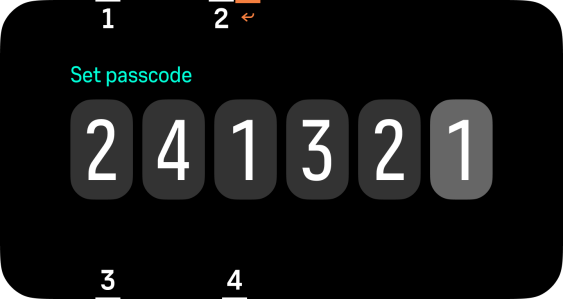
Confirm the passcode.
- A popup indicates if the passcode setting is successful. If the passcodes don't match, try again.
Once you set a passcode, your device automatically locks when the device goes idle. To unlock it, press any buttons and enter your passcode.
To set a new passcode, select the Change passcode option in the Passcode menu.
If you enter an incorrect passcode 5 times in a row, you have to reset the device and set a new passcode.
To turn off the passcode:
- Go to Device settings > Device lock.
- Toggle off the Use passcode option.
- Enter your current passcode.
If you turn off the passcode, your device forgets it and you have to set a new passcode after turning it back on.
The device always unlocks if you start diving and you cannot lock it during diving. When the dive is over and the device returns to surface view, the device will automatically lock again if it was locked before the dive.