Suunto Nautic 使用者指南
Table of Content
Table of Content
水面畫面與潛水選項
所有潛水模式的水面畫面都相同,但每一種模式都有多項該模式專屬的選項,可依您的潛水需求進行調整。
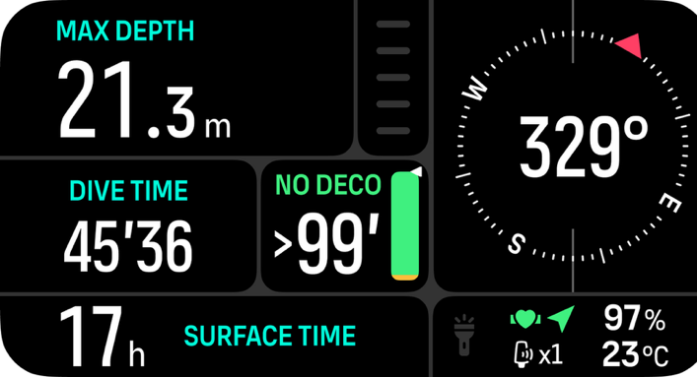
視您在該潛水模式中使用的功能而定,水面畫面上會顯示一組圖示,例如心率、Tank POD 和 GPS。在螢幕上可以看到以下元素:
- 前一次潛水的最大深度
- 前一次潛水的潛水時間
- 水面時間
- Tank POD 圖示(如果已連結並啟用)
- GPS 訊號(如果已啟用)
- 若已啟用,則顯示心率帶圖示
- 剩餘電量百分比
- 溫度
- 切換視窗內容
GPS 訊號:搜尋時,箭頭圖示(GPS 已連線)會閃爍灰色燈光,發現訊號後則會轉為綠色。建議您等待 GPS 圖示變為綠色後再跳入水中,以取得準確的 GPS 位置。
心率:心形圖示在搜尋時會閃爍灰色,一旦取得訊號便會轉為綠色。請參閱 配對心率感應器。
Tank POD:僅在您的氣體已與 Tank POD 配對時,才會顯示氣瓶圖示。