Suunto Nautic S User Guide
- Tank pressure
Tank pressure
Once your Suunto Nautic S is linked to a Suunto Tank POD, you can follow the tank pressure both in the switch window and on the arch in the tank pressure view. See Key information during diving on how tank pressure is shown on the arch.
The following examples show different tank pressures:
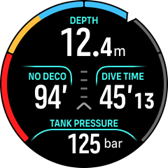
Tank pressure is 125 bar:
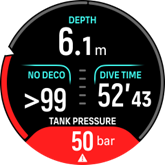
Tank pressure is 50 bar:
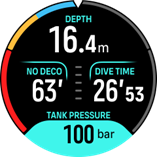
An extra tank pressure alarm is set to 100 bar:
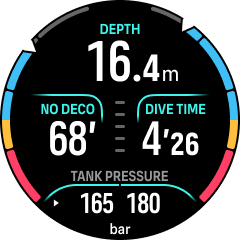
Sidemount view when paired 2 Tank PODs
If you have not paired a Suunto Tank POD, the switch window tank pressure will read No Tank Pod. If A Tank POD is paired but no data is being received, the field shows - -. This may be because the POD is not in range, the tank is closed, or the POD battery is low.
LED lights may interfere with the Tank pressure signal.